Stop re‑explaining your work to every AI tool.

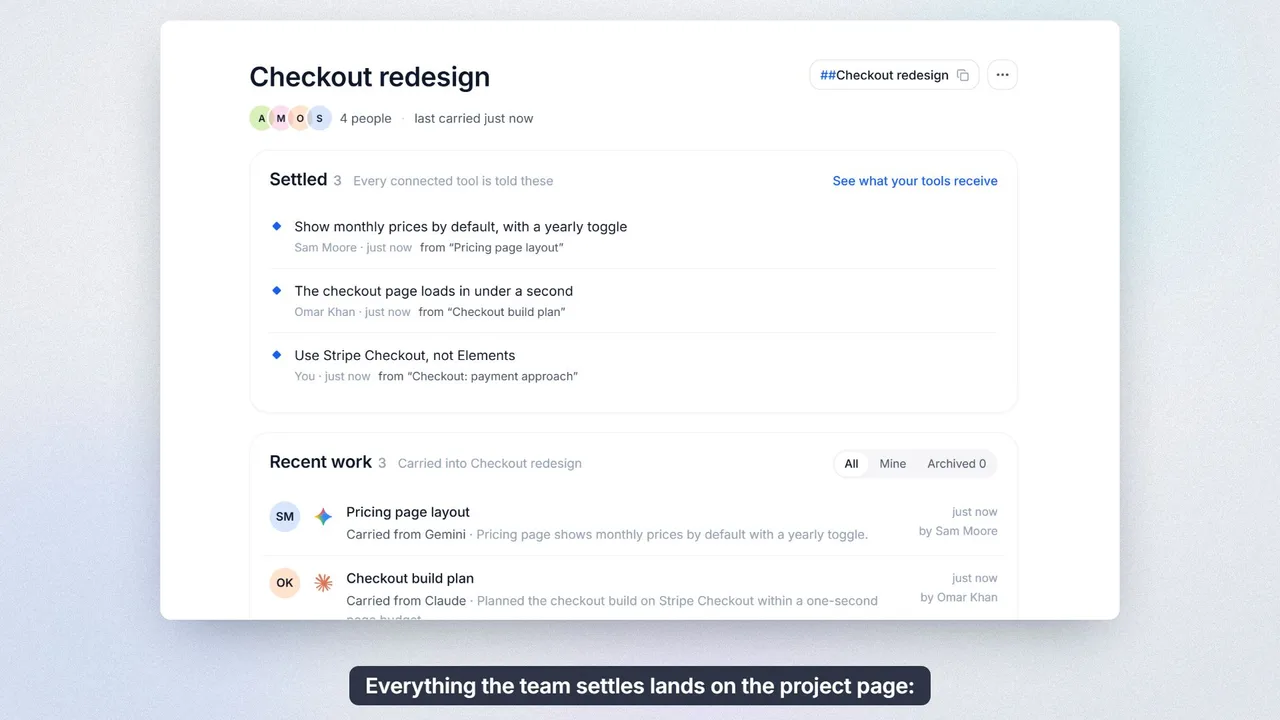
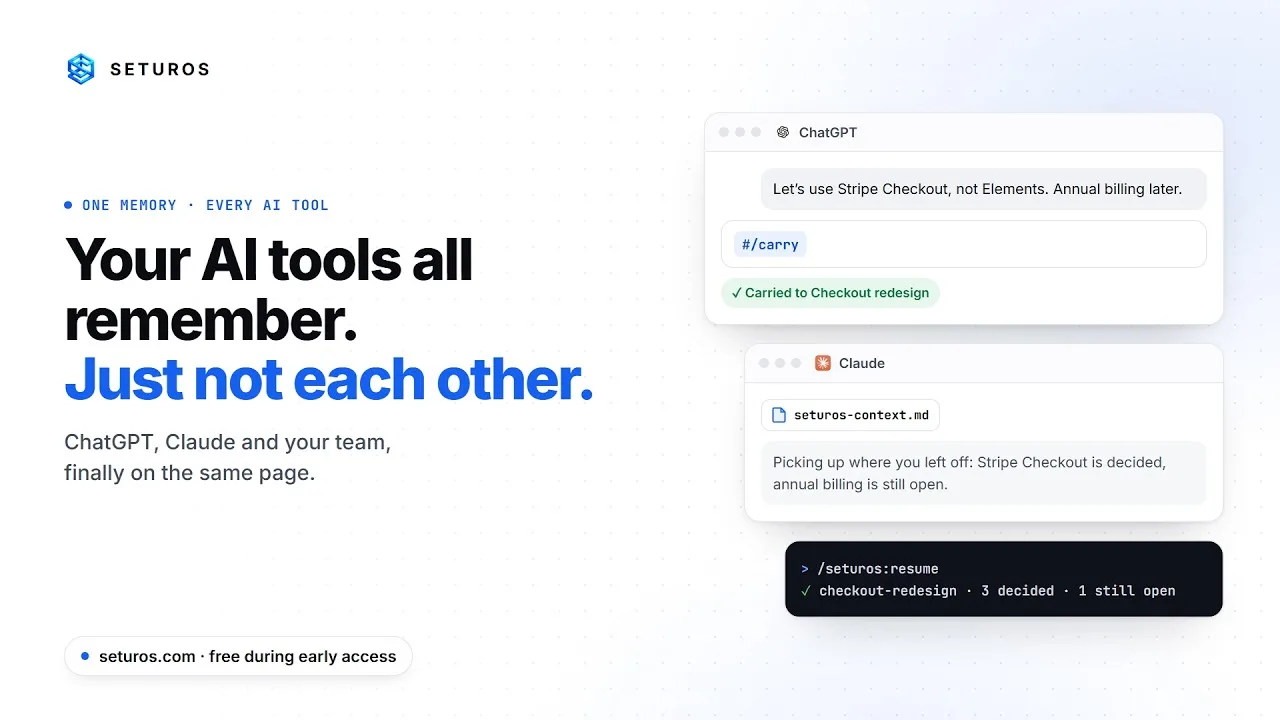
Seturos carries the decisions, open questions and rules you settled in one tool into the next one. ChatGPT to Claude Code to Word, through your browser, your desktop and the web.

Early access: open to everyone from 30 September 2026. The first 1,000 people get Pro free for 45 days. No card, no model key.

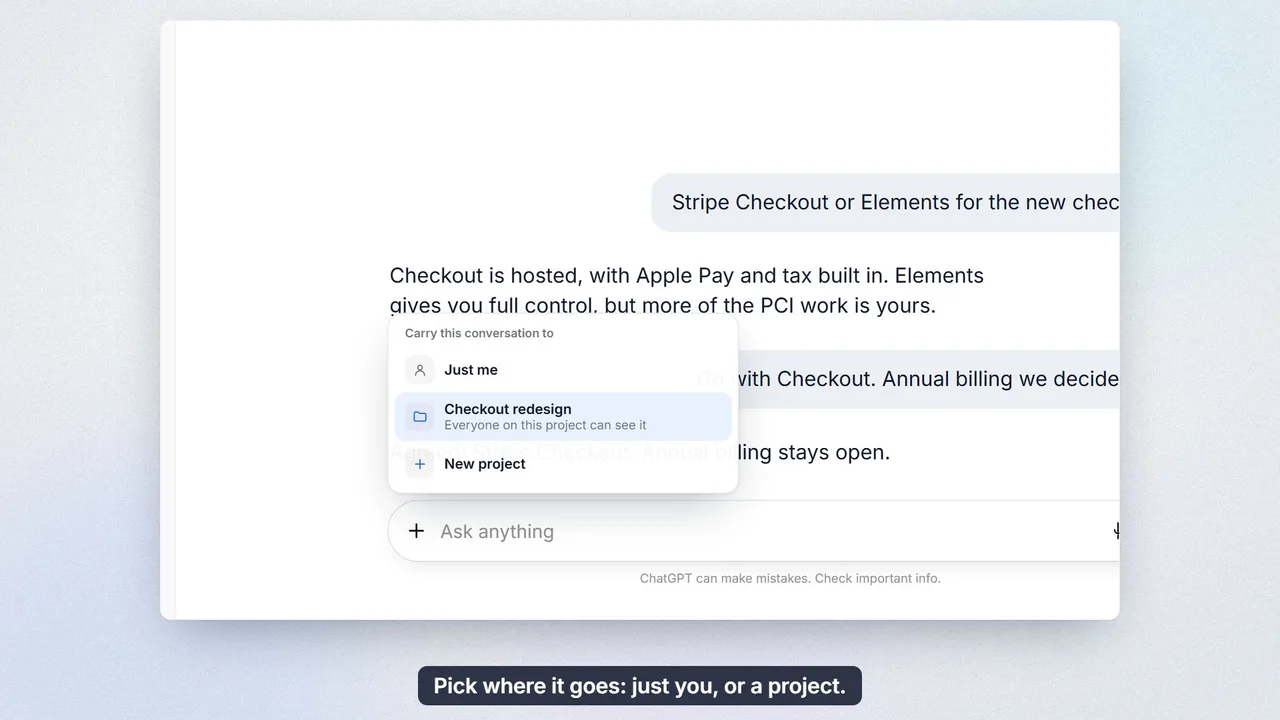
09:12 · Browser You settle the launch scope in ChatGPT. #/carry keeps what was decided, or Follow carries each tool as you leave it.

An example day. The project and the words are made up; the controls are Seturos’s own.
One memory, wherever you work.

The same three controls (the mark, Follow and the bucket) in your browser and on your desktop, your projects on the web, and your coding tools through MCP. Start with the web app; everything shares one account.

Web app

Every project, with what was carried into it from each tool, what was decided and what is still open, for the people on the project. Sign up here first; the extension and desktop app connect to this account.

Browser extension

A dock at the edge of every page. The mark opens the command bar (Ctrl+Shift+K), Follow picks the project your work goes to, and the bucket keeps things for later. Type ## in any message box to name a project or a person; #/carry and #/resume move work between ChatGPT, Claude, Gemini and 15 more chat tools. Tap Ctrl twice to point at anything on a page.

Chrome · Web Store listing coming soon

Open Seturos · Ctrl+Shift+KKept for later
The real dock. Try Follow.

Desktop app

The capsule sits at the edge of your screen with the same three controls, and steps aside when a browser is in front. Highlight anything and press Ctrl+Shift+' to carry it; Ctrl+Shift+; brings ## to any app, and tapping Ctrl twice points at anything in a Windows application. It reads what you highlighted or pointed at, never your screen, and its menu lists the coding repositories on this computer.

Windows · download coming soon

Open Seturos · Ctrl+Shift+KKept for later
The real capsule. Try Follow.

Claude Code

Adds /seturos:resume, /seturos:carry and /seturos:find to Claude Code. Each repository keeps its own sessions and never sees another’s. In Claude Code, run:

/plugin marketplace add labby2094-blip/seturos-plugin
/plugin install seturos@seturos-plugins
Available now

Any MCP client

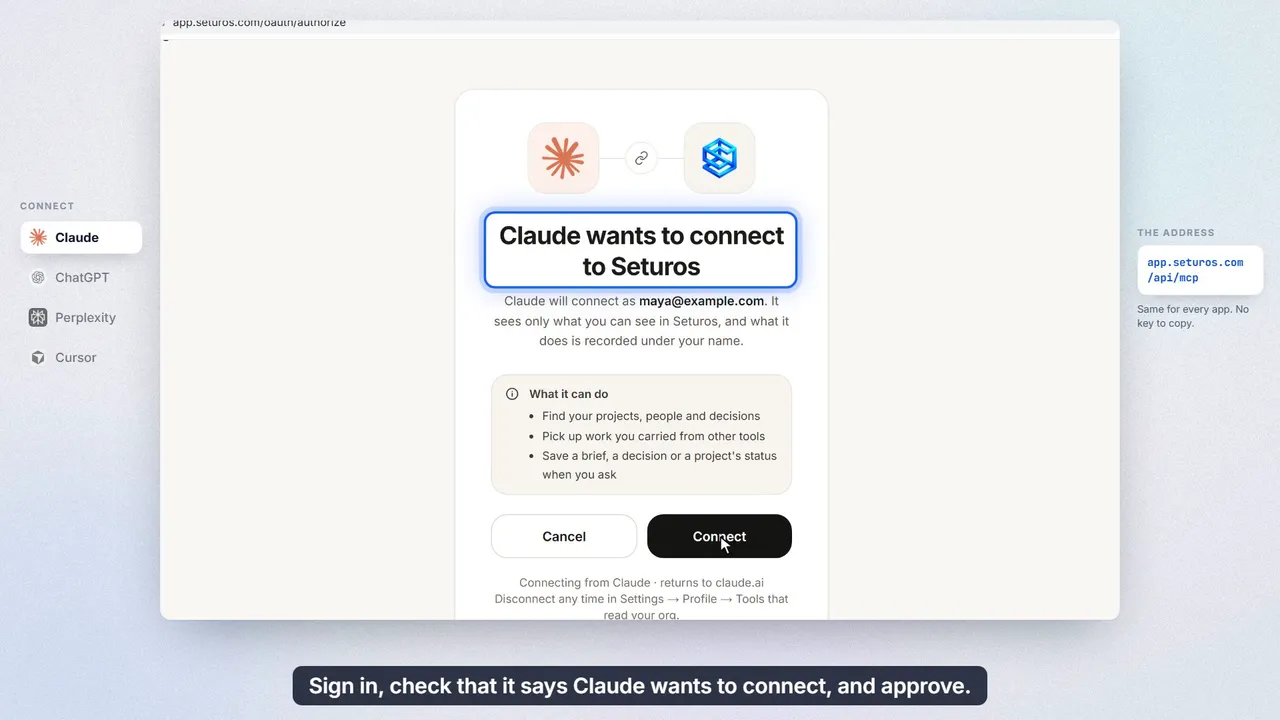
Claude, ChatGPT, Cursor, Codex and other tools that speak MCP can resume and carry work. Listed in the official MCP registry as com.seturos/seturos.

https://app.seturos.com/api/mcp
Available now

Tap Ctrl twice. Point at anything.

Most of a page can’t be dragged and doesn’t copy cleanly: a ticket’s status, an error message, a table row, a chart legend. Point at it instead, and Seturos carries what it says, not a picture of it.

  1. Tap Ctrl twice. A crosshair and a bar appear. Nothing is read until you choose.
  2. Point and click. The box follows your pointer; [ and ] widen or narrow it to the part you mean. Esc cancels.
  3. It goes where you’re working. Into the message box when the page has one, like ChatGPT or Claude, and into the bucket, kept for later, when it doesn’t.

In your browser with the extension. On Windows, the desktop app does the same in any application.

What travels is the part the next tool needs.

Not a transcript. When you resume, the next tool receives a brief like this one: the same words it would take you ten minutes to type.

Context carried over from other tools, for the project “Checkout redesign”. Continue this work. Do not start over or re-introduce yourself.

Already settled. These govern what follows, and are not open for rediscussion:
- Guest checkout stays; accounts are optional
- Card and PayPal only at launch
- Ship behind a flag to 10% first

Still open, not decided. Do not invent an answer:
- Who signs off the copy?

From ChatGPT: “Checkout decisions” (today 09:12, 38 turns)
Agreed the launch scope for the checkout redesign: guest checkout, card and PayPal, a 10% flagged rollout. Crypto left out, since its compliance review cannot land before the 14th.
  1. Decisions arrive as rules.

    The next tool is told what is settled and not up for debate, so it stops proposing what you already ruled out.

  2. Open questions stay open.

    What nobody decided is marked as undecided, so a model doesn’t quietly decide it for you.

  3. A brief, not the transcript.

    Thirty-eight turns become a few lines sized for the next message box. Ask about a detail and Seturos quotes the original.

Works without a model key.

Briefs are built from what was said, without calling a model, so Seturos works from the first minute. Add your own Anthropic, OpenAI or Google key and they get sharper. Those calls are billed by your provider, on every plan.

## points at the exact thing.

Type ## in any message box, on any site, to name a project or a person. Seturos knows which one you mean, and so does the next tool you open.

Works with the 92 tools you already use.

Seturos doesn’t replace any of them. It carries what you settled in one into the next: in the browser, in your coding tools, and in any app on your desktop.

AI chat 18

Carry a conversation out, and resume it in the next chat, with what was decided at the top.

  • ChatGPT#/carry #/resume
  • Claude#/carry #/resume
  • Gemini#/carry #/resume
  • Perplexity#/carry #/resume
  • Microsoft Copilot#/carry #/resume
  • Grok#/carry #/resume
  • NotebookLM#/carry #/resume
  • Mistral · Le Chat#/carry #/resume
  • DeepSeek#/carry #/resume
  • Meta AI#/carry #/resume
  • Poe#/carry #/resume
  • Qwen#/carry #/resume
  • Doubao#/carry #/resume
  • Kimi#/carry #/resume
  • Yuanbao#/carry #/resume
  • ChatGLM · Z.ai#/carry #/resume
  • DuckDuckGo AI#/carry #/resume
  • HuggingChat#/carry #/resume

Coding tools & MCP 6

Resume and carry work from your editor or terminal. Each repository keeps its own sessions.

  • Claude Code/seturos:resume /seturos:carry
  • Codexresume_work carry_work
  • Cursorresume_work carry_work
  • VS Coderesume_work carry_work
  • Windsurfresume_work carry_work
  • Claude connectorresume_work carry_work

Deep research 7

Turn what you carried into a full research brief, and bring the finished report back as context.

  • ChatGPT Deep Research#/research #/home
  • Gemini Deep Research#/research #/home
  • Perplexity Labs#/research #/home
  • Claude Research#/research #/home
  • Grok DeepSearch#/research #/home
  • Manus#/research #/home
  • Genspark#/research #/home

Image, video, audio & design 21

One generation prompt built from your carried work, with the rules agreed upstream already in it.

  • Higgsfield#/make #/filed
  • Runway#/make #/filed
  • Sora#/make #/filed
  • Veo#/make #/filed
  • Midjourney#/make #/filed
  • Ideogram#/make #/filed
  • Leonardo#/make #/filed
  • Adobe Firefly#/make #/filed
  • Canva#/make #/filed
  • Omni#/make #/filed
  • Kling#/make #/filed
  • Pika#/make #/filed
  • Luma Dream Machine#/make #/filed
  • Recraft#/make #/filed
  • HeyGen#/make #/filed
  • Synthesia#/make #/filed
  • ElevenLabs#/make #/filed
  • Suno#/make #/filed
  • Gamma#/make #/filed
  • Descript#/make #/filed
  • CapCut#/make #/filed

Work apps 40

Name a project or a person with ## in any message box, and draft into the tool the work lands in.

  • Notion#/draft
  • Obsidian#/draft
  • Craft#/draft
  • Google Docs#/draft
  • Outlook#/draft
  • Microsoft Word#/draft
  • Substack#/draft
  • Medium#/draft
  • LinkedIn#/draft
  • X#/draft
  • Slack#/draft
  • Microsoft Teams#/draft
  • Google Chat#/draft
  • Gmail#/draft
  • Jira#/draft
  • Linear#/draft
  • Asana#/draft
  • ClickUp#/draft
  • Monday#/draft
  • Trello#/draft
  • Basecamp#/draft
  • Airtable#/draft
  • GitHub#/draft
  • GitLab#/draft
  • Confluence#/draft
  • Coda#/draft
  • Quip#/draft
  • Dropbox Paper#/draft
  • SharePoint#/draft
  • WordPress#/draft
  • Webflow#/draft
  • Ghost#/draft
  • HubSpot#/draft
  • Salesforce#/draft
  • Zendesk#/draft
  • Intercom#/draft
  • Figma#/draft
  • Frame.io#/draft
  • Miro#/draft
  • Loom#/draft

On your desktop, any Windows app. Word, Excel, Outlook, a PDF reader: the desktop app carries whatever you highlight, and brings ## to any text box.

What Seturos never does.

A memory for your work has to be trusted with it. The first five are how the product is built; the last is our policy, written into the privacy policy.

  • Read a page you didn’t point it at.The extension reads a page when you carry it, or while you follow a project. Otherwise it knows which tool you’re in, and nothing on the screen.
  • Watch your screen.The desktop app reads what you highlighted or pointed at, at the moment you do it. Nothing else.
  • Mix up your repositories.A coding session is filed under the repository it ran in, and is never offered to another one.
  • Store the keys you paste.API keys, tokens and connection strings are removed from what you carry before it is stored.
  • Show your work to people who can’t see it.Every answer is scoped to the person asking. Follow a project and its members see what you carry; nobody else does.
  • Train on your work, or sell it.Your data answers your own organisation’s questions and nobody else’s.

Free to start. Pro when you rely on it.

Every plan works without a model key. When you add one, your tokens are billed by your own provider, not by us, which is why Pro can cost $5 a month, billed annually.

Team

$15
per person / month · no seat limit
billed annually · $19 monthly

First 50 teams: 45 days free

Everything in Pro for everyone on the team, plus seeing across people.

  • Shared projects the whole team resumes from
  • Repositories filed to the project, for everyone on it
  • Each person sees exactly what their projects carry
  • See who is working on what, across the team
Start free trial

Enterprise

Talk to us
annual contract

Everything procurement asks for, on the schedule the questionnaire arrives.

  • SSO / SCIM and audit log export
  • Directory sync from Google Workspace, Okta or Rippling
  • Self-host via Docker Compose
  • Everything in Team, for every unit
Talk to us

Early access: the first 1,000 people get Pro free for 45 days, and the first 50 teams get Team free for 45 days; everyone after gets 14 days. No card, and no trial ends before paid plans have been on sale for two weeks.

Questions.

What does “early access” mean?

Seturos opens to everyone on 30 September 2026. It works today and it will change quickly as we learn from the people using it. Free stays free.

Every new account starts with a free trial: Pro for a person, Team for an organization. The first 1,000 people and the first 50 teams get 45 days, and everyone after gets 14 days. No card. When it ends you are on Free, and nothing is charged or deleted.

Do I need an OpenAI or Anthropic key?

No. Carrying, briefs and resuming work without calling a model, so Seturos is useful from the first minute.

Add your own Anthropic, OpenAI or Google key and briefs get sharper; those calls are billed by your provider, on every plan. Seturos never pays for model calls, so it never needs your prompts on its account.

Which tools does it work with?

In the browser: ChatGPT, Claude, Gemini, Perplexity, Copilot, Grok and twelve more chat tools; deep-research tools; creative tools like Midjourney and Runway; and work apps like Gmail, Slack, Notion and Jira for ## and drafts.

For code: Claude Code, Codex, Cursor and other tools that speak MCP. On the desktop: any Windows application you can highlight text in.

Is there a Mac app?

The desktop app is Windows first. On a Mac, the browser extension, the web app, Claude Code and MCP all work.

What does Free include, and what does Pro add?

Free is one person, forever: your work carried into two AI tools, the last 14 days of it, in one repository. Pro removes all three limits for $7 a month, or $5 billed annually.

Hitting a limit never loses anything. What you do is still recorded, and Seturos tells you which tools and repository you are keeping.

Can I cancel, or get a refund?

Cancel any time. Your plan runs to the end of what you paid for, then moves to Free, with nothing deleted.

Changed your mind? Ask within 14 days of paying and we refund it in full. The details are on the cancellation and refunds page.

Who can see what I carry?

You, unless you follow a project. Then the people on that project can too. Every answer is scoped to the asking person’s own organisation and access. We don’t sell your data or train models on it.

The details are in the privacy policy and on the security page.

Can I delete what Seturos keeps?

Yes. Delete, move or export any carried conversation from the web app, or ask us to delete your organisation’s data. Deletion requests are completed within 30 days.

Stop re-explaining your work.

Early access opens to everyone on 30 September 2026. Start with 45 days of Pro for the first 1,000 people, with no card and no model key, then stay on Free for as long as you like.